
An online store’s security model should answer three questions: who can change its business data, who can run code in a customer’s browser, and who controls the route to payment. Those are different kinds of authority. Neither a feature’s name nor the security of the payment processor answers all three.
Setka is our product. We control its generated code, integrations, and payment navigation. The app-supplied script/configuration path used to divert shoppers in the documented Shopify incidents is not available within Setka’s architecture.
If your own store is redirecting shoppers unexpectedly, start with the Shopify checkout incident guide. It puts containment and recovery before the architecture discussion.
Three kinds of authority in a store
A merchant might install an app to add product options. The business requirement is narrow: let customers choose an engraving or a gift wrap. The integration’s technical authority can be broader than that visible job.
| Authority | What it means | A useful merchant question |
|---|---|---|
| Business data | Reading or changing records such as products, customers, and orders | Which records can this integration read or edit? |
| Storefront execution | Running code that changes a page or reacts to a customer’s actions | What can its code change in the customer’s browser? |
| Payment navigation | Deciding where a purchase action sends the customer | Can it change the destination or introduce another step before payment? |
An app’s API permissions help answer the first question. They are not a complete description of the second and third. Shopify’s app-management documentation describes access areas and recent API activity. Its theme-extension documentation separately describes assets, including JavaScript, that integrate with the store.
So an integration needs two checks: which records it can reach, and what it can change where a customer shops.
What happened before checkout
On 10 October 2026, developer Roman Zipp investigated a fake-checkout redirect on MechanicalKeyboards.com. His firsthand account traced the behavior through Hulk Product Options. An app asset retrieved configuration containing custom JavaScript, which intercepted the route to checkout and diverted the shopper to an imitation payment form.
In the observed sequence, submitting the imitation form then sent the shopper to genuine checkout. The attacker did not need to make the legitimate checkout disappear permanently. A real purchase could follow the malicious intermediate step.
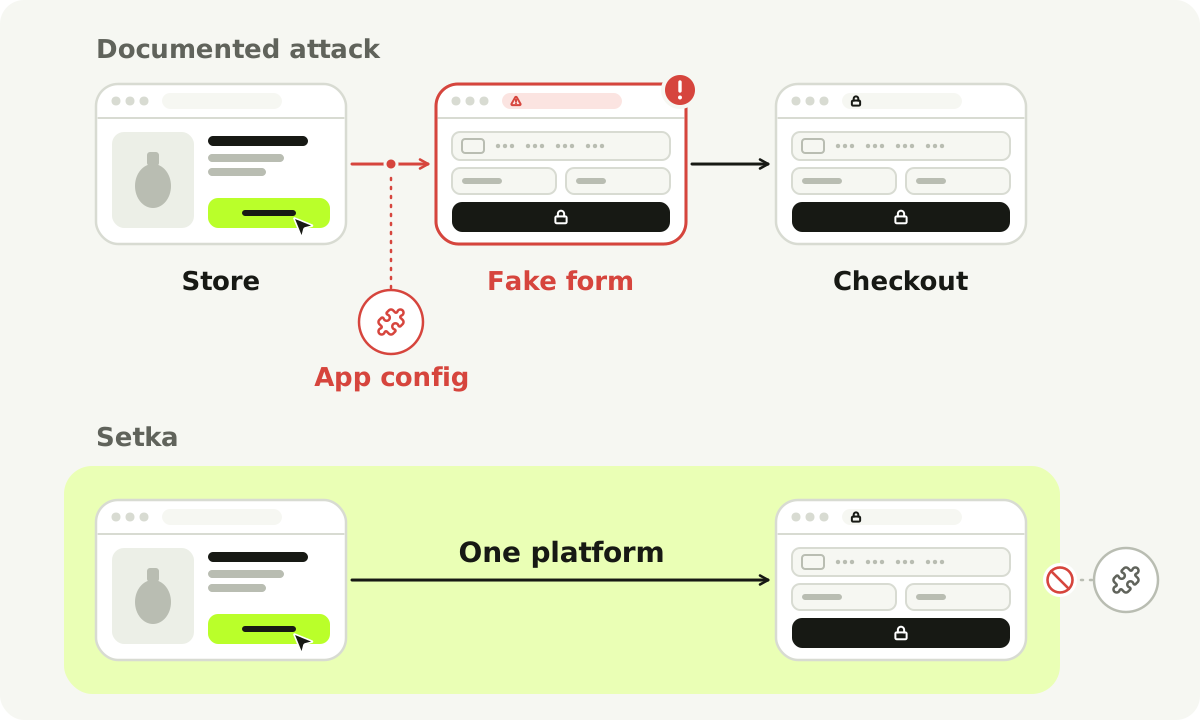
The upper path summarizes the documented observation. The lower map shows which parts of the buying journey share Setka’s controlled ownership.
The practical failure was a change in authority: configuration from an integration supplier became behavior that could redirect the buying journey. The investigation did not establish how the attacker got in, so this path explains one documented diversion, not the entry point of every reported incident.
A separate Selleasy notice, updated 16 October, acknowledges a 13 October incident involving injected scripts and external phishing redirects. That is a second, vendor-confirmed example of the same consequence, though not proof of a shared entry point.
When a setting becomes executable behavior
A setting can supply data: a label, a product identifier, a color. Application code decides how to use that value. A setting that supplies JavaScript, or untrusted content rendered as executable markup, can carry a different kind of authority.
Consider a fictional wishlist button. Its label should answer “What text should the button display?” If that value can instead introduce executable behavior, the setting can do more than name the button. The implementation must preserve the boundary between supplied content and application behavior.
Shopify’s own theme-extension security check addresses untrusted values rendered without safe escaping. It recommends escaping those values and avoiding raw HTML rendering. It illustrates the boundary; it is not a finding about what caused these incidents.
So “the app only adds a small feature” settles nothing. What a feature is for and what its code is allowed to do are separate questions.
A familiar script address is only part of the chain
The code a browser first loads may fetch more code or configuration elsewhere. Reviewing only that first file can miss the behavior introduced later.
The documented Hulk Product Options path began with an asset served from Shopify’s CDN, then retrieved app configuration. That doesn’t mean Shopify’s CDN was breached. It means a familiar address said nothing about the configuration loaded after it.
Theme-file history has a similar limit. Theme app extensions are designed to integrate without directly editing theme code, and their assets can include browser code. An unchanged theme file therefore does not prove that the live experience has stayed unchanged. The extension framework documents that distinction.
OWASP’s third-party JavaScript guidance describes the wider problem: a supplier can change what it serves after an integration was originally reviewed. The relevant unit of trust is the running integration and its change paths, not just the file a merchant saw at installation.
Why a protected checkout does not settle the preceding journey
Shopify documents that its checkout UI extensions run in an isolated environment without access to sensitive payment information or the checkout page’s underlying HTML. Those protections apply to that environment.
Storefront code runs earlier in the customer’s journey. If a purchase action is intercepted before the customer reaches genuine checkout, a protection inside that checkout is not a description of the page the customer has been sent to instead.
The same reasoning applies when choosing a payment provider. The provider can protect its own payment flow; its presence does not certify everything another page asks the customer to do beforehand. A store owner needs an account of the whole route, including who can insert a step or replace a destination.
For investigation, follow the customer’s actual path. For platform selection, ask who has authority over that path.
How Setka controls those boundaries
Setka writes the store’s code itself, in a controlled way, and owns the whole stack, including how each integration works inside it. Storefront generation and commerce run in the same platform. The merchant never receives a generated theme-code project to connect and maintain.
That closes the path used in the incidents above. Settings and integrations in Setka give an outside supplier no route to introduce code that runs on the storefront, so nothing can replace the route to payment or insert an imitation payment step that way. Control of that route stays with the platform. The boundary is part of the architecture; the merchant isn’t asked to spot a dangerous change after it has already reached shoppers.
| Part of the system | Setka’s model | What that means for a merchant |
|---|---|---|
| Generated storefront | Controlled code owned by Setka | Direct the store without receiving a separate theme implementation to maintain |
| Supported integrations | Their behavior and integration with the store are controlled by Setka | An outside app supplier does not receive the script/configuration route described in the attack |
| Payment navigation | Controlled within the platform’s architecture | That integration surface cannot substitute an imitation step for the intended payment journey |
| Ongoing implementation | Storefront and current commerce share an owner | Changes remain within one compatibility model |
Setka’s checkout works with a merchant-owned Stripe account. Stripe handles account verification, payment-method eligibility, and payout configuration; Setka connects its checkout to paid orders and the current commerce workflow. Our payments guide explains that division of responsibility. Connecting Stripe is one part of the system; control of the store before payment is another.
Who answers for the boundary
Owning the stack puts the work of securing and maintaining its code, dependencies, access, and integrations on us. That is the trade for the merchant: you don’t audit what each app supplier ships into your store, and one team answers for the path from storefront to payment.
Setka also saves every storefront version, so you can return to an earlier design. That is a design tool, and we don’t present it as incident response.
Questions to use when choosing any store platform
Ask these before a small feature becomes a large dependency:
- Which settings supply data, and which can introduce executable behavior?
- Can an integration supplier change customer-facing behavior remotely?
- What prevents a feature from changing the route to payment outside its intended purpose?
- How are changes delivered, and who can identify and disable the affected component?
- What does the platform own, and what implementation work will stay with your business?
A good answer names the boundary and its owner instead of offering a blanket “secure” label. The same questions help evaluate an app, a commissioned storefront, or an integrated platform.
If you already run Shopify, use our app audit and removal guide to build that picture from your current store. If you are choosing a platform, compare Setka’s operating model with Shopify, or start a Setka store around your catalog and brief.